Overview
A dormant account is an account assigned to a vendor that has not conducted active transactions for a set period of time. The reason for non-trading by the vendor can vary and it will be the responsibility of the assigned Sales Rep/Agent to reach out to understand the reason for the vendor not trading.
Our systems will automatically locked a vendor's account and apply the dormant status if the vendor has not conducted active trades for 120 days. Should a vendor request to reopen their account, our Trusted Centre team will carry out this action but after the Contact Centre have completed the necessary steps during the escalation process.
Call Centre Agent Guidance
Our vendors have access to our services through multiple channels on their devices. Our vendors can use either our VAS (Value Added Service) Device or the Kazang Android App directly from their mobile device.
It is important to note which channel the vendor is accessing our services from to successfully escalate their query for effective resolution.
Android App |
|
VAS (Value Added Service) Device |
The same process for our Android App will be followed but there are key differences that the Contact Centre agent needs to be aware of for a successful escalation into our Trusted Centre Team.
|
Submitting the KYC (Know Your Customer) Form
Our vendors will be required to provide key information to match with the dormant details on our Content Ready system. This request can be completed by sharing link to the KYC Form template which will be added to the escalation details to our Trusted Centre Team.
Follow the below guidance steps to successfully submit the KYC (Know Your Customer) Form:
| Step 1 | Select the KYC Form from the Canned Forms list on Freshdesk | 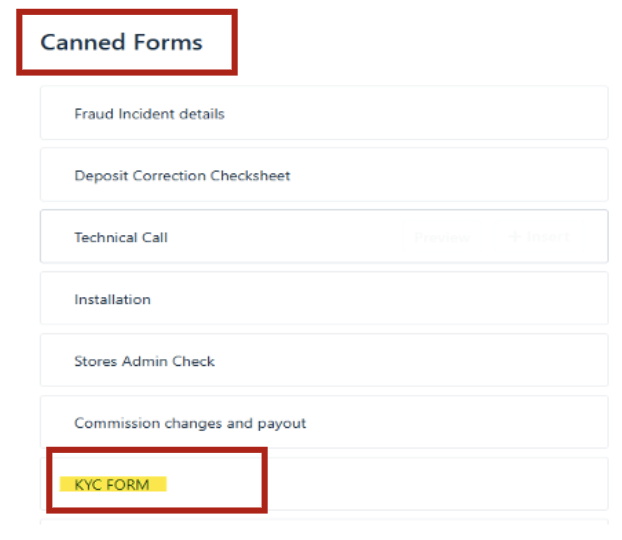 |
| Step 2 | Add the form on the reply message to the vendor and await for feedback | 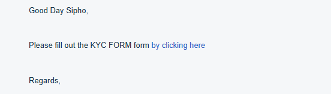 |
| Step 3 | Once the vendor has updated the form, the details will be displayed as such; | 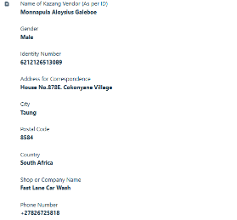 |
| Step 4 | Review and confirm that details matched to what we have previously captured on Content Ready. If the details match, successfully escalate the query to our Trusted Centre Team. If the details do not match, please advise the vendor to update any outdated or missing information before escalating. |
*Have we missed anything in this article?
Email learninganddevelopment@kazang.com should you need any more information to be added onto this article.
Was this article helpful?
That’s Great!
Thank you for your feedback
Sorry! We couldn't be helpful
Thank you for your feedback
Feedback sent
We appreciate your effort and will try to fix the article