Overview
The Vendor Cash Deposit (VCD) is an efficient and convenient process that allows our vendors to instantly transfer money between devices to ensure that their Kazang account balances are always topped up to continue trading.
This process has also been improved to allow the sender to enter a personalized reference, which will help us and the receiver of the funds to identify the payment with less hassle.
How to complete the Vendor Cash Deposit Process?
| Step 1 | Navigate to the main Kazang vending menu |
| Step 2 | Scroll down and click on Kazang Transfer |
| Step 3 | Select either transfer or transfer with fee If transfer with fee is selected then the device owner would be able to insert the fee that they are charging for the transfer |
| Step 4 | Enter the Kazang Account number that the funds are being sent to |
| Step 5 | Enter the amount to be transferred |
| Step 6 | Enter the amount you are charging for the transaction (If applicable) |
| Step 7 | Enter the payment reference |
| Step 8 | Double check that the information entered is correct |
| Step 9 | Click on Submit A slip will now be printed can be given to the sender. This slip will contain all the information pertaining to the transaction. |
Vendor Cash Deposit Only Vendors
If a vendor has more than one shop within their network, they do have the decision to set one of the shops in their network to solely focus on topping up the Kazang account balances of the other locations in their network. This ultimately labels that specific vendor location as Vendor Cash Deposit Cash Only Vendor.
It is key to note that these types of vendors within the network do not always want to sell our VAS products but purely to use our Kazang device to offer our VCD service to other small businesses in the area. In this case, we will provide them with a device but connect them to the VCD ONLY group on Content Ready. This means that they would only be able to perform VCD transactions on the device.
Vendor Cash Deposit Scenarios
Vendors will contact us requesting assistance for any issues that may arise when completing the VCD process. Below are scenarios and query types that are normally received regarding VCD queries from our vendors.
It is also to note the below points when dealing and resolving these query types:
- All VCD requests must be forwarded on our FreshDesk and FreshChat (FD ticket must be created) platforms only and no telecom requests will be processed.
- All VCD funds must be corrected directly to the sender’s wallet (VCD vendor) and not to any provided reference to limit the risk of funds being moved around.
- In alignment with the rules of the Payments Association of South Africa (PASA) If an incorrect VCD has been processed and reported, no action may be taken against the recipient’s account, including account locking, placing a deposit hold, or transferring funds without the recipient’s consent, unless there are substantiated allegations of fraud.
- If vendor (requester) doesn’t have/ didn’t provide the POP, transaction must be tracked on the vendors transaction history on CR.
- Older than a week payment reversal request will be routed to the sales team for investigations.
- Ticket number must be updated on CR notes with a description of the query.
- Notes must always be updated on the ticket with actions taken.
- As per POPIA no details must be shared with either of the vendors.
- In any case where both the receiver and sender are claiming the same funds, send an email to the Regional Sales Manager to arrange for an agent/ rep’s involvement.
Process | Summary | Resolution Steps | Additional Resolution Information |
Full VCD balance available | This is when the full deposit balance is available on the recipients account. | Contact the receiver of funds to get confirmation if funds belong to them, if consent has been given by the receiver: Reversal must be processed from the wallet, and this will secure them to the holding account.
On the funds transfer option, you will use the device account to device account function
| If vendor confirms that funds belong to him/her, the sender must be informed with the dispute and a formal complaint letter must be requested from the sender for us to conduct further investigations Ticket must be pended on the agent’s dashboard for 3 days with follow up updates and be moved to the CC escalations queue on the 3rd day COB. |
No funds available | This is when the recipient has utilized the whole deposit amount, and nothing is available on the wallet. |
| If vendor confirms that funds belong to him/her, the sender must be informed with the dispute and a formal complaint letter must be requested from the sender for us to conduct further investigations If you cannot get hold of the vendor, we will pend the ticket for a week by default to ensure that the sender is the correct owner of the funds. Ticket must be pended on the agent’s dashboard for 3 days with follow up updates and be moved to the CC escalations queue on the 3rd day COB. |
Portion of funds available | This is when the recipient has used some of the funds that were transferred to his/her account regardless of how much is the balance left. | If the vendor confirms that funds do not belong to them process a funds transfer to sender:
Arrange a repayment of the outstanding amount with the receiver and update your notes with the agreement | If vendor confirms that funds belong to him/her, the sender must be informed with the dispute and a formal complaint letter must be requested from the sender for us to conduct further investigations If you cannot get hold of the vendor, we will pend the ticket for a week by default to ensure that the sender is the correct owner of the funds. Ticket must be pended on the agent’s dashboard for 3 days with follow up updates and be moved to the CC escalations queue on the 3rd day COB. |
Repayment arrangement- vendor agreement | When funds are utilized whether it’s the whole balance or a portion, a repayment arrangement must be done, and this scenario is relating to the customer service agent reaching an agreement with the vendor. Some vendors will arrange for multiple instalments (a minimum of 2 instalments is acceptable) and some vendors will manage to pay the full balance at once) | Contact the receiver of funds to get confirmation if funds belong to them.
| Agent must probe for the full balance repayment however if vendor is not willing to pay in full a minimum of 2 instalments is allowed. Notes must be always updated every time a vendor pays, and vendor’s deposits must be withheld until the full balance is repaid. On CR after releasing a deposit agent must transfer the agreed instalment amount to the senders account under device funds transfer option once done deposits must be withheld again until the full payment is settled. Sender must be notified with the transferred amount and the repayment amount outstanding. |
Repayment arrangement- vendor refusing | It is not always easy to reach our vendors and those we manage to reach do not always cooperate; in this instance we must involve the sales team (reps and agents through regional managers) as a source of support when a vendor is refusing to pay back the utilized funds. | Sender must be advised with the dispute. A Formal complaint letter must be submitted to further the investigations. Deposit hold must be activated. Dispute and the complaint letter must be forwarded to the regional manager with a brief of what we have done and the feedback from the receiver. |
Vendor Cash Deposit - Superwallet
Vendors can complete the VCD process via an active Superwallet on their Kazang accounts. As we know, a superwallet account is separate and different from a normal vending account.
Up until recently, it was not possible to send funds from a normal vending wallet to a superwallet but this has changed now, and we discuss the details below.
A vendor can now process a vendor cash deposit from a normal Kazang vending wallet to a Superwallet. A fee of 0.2% will be added to the total amount payable. The 0.2% fee is calculated using the total amount being sent.
Example of a VCD from a normal vending wallet to a superwallet
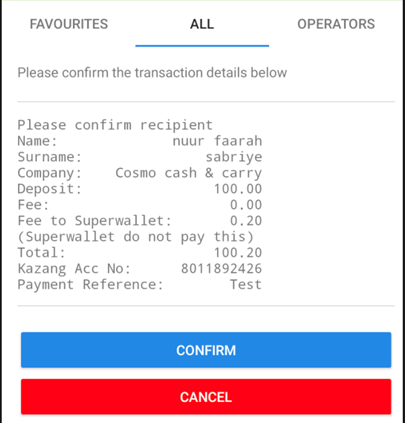
Key Points to Remember when completing the VCD via the Superwallet:
- To move money from a Superwallet to another Superwallet will be free of charge
- To move money from a Superwallet to a Vending wallet will be free of charge
- To move money from a Vending wallet to another Vending wallet will be free of charge
- To move money from a Vending wallet to a Superwallet will incur a fee of 0.2%calculated from the total amount being sent.

Was this article helpful?
That’s Great!
Thank you for your feedback
Sorry! We couldn't be helpful
Thank you for your feedback
Feedback sent
We appreciate your effort and will try to fix the article