Overview
Kazang Pay Advance is a financial product designed exclusively for our active Kazang Pay Vendors. With a specific set of eligibility criteria and repayment terms, the Kazang Pay Advance feature provides access to short-term credit advances to our vendors. This guide will provide help to our Support Staff to understand not just the product characteristics, but also the application process and the terms and conditions under which a Kazang Pay Advance application may be approved or declined.

Product Characteristics
Eligibility:
Kazang Pay Advance is only available to a Kazang Pay vendor that has processed and been processing a minimum of R40k card through-put per month for the last 12 months.
Advance Amount Range:
The amounts available to our vendors for Kazang Advance ranges from minimum amount of R8,000 to a maximum amount of R15,000. One key feature to note is that a vendor will be not able to receive an advance for any amount below the R8,000 minimum value.
Availability:
Once a vendors application has been deemed successful, the funds will be available almost immediately in their Kazang wallet. Depending on the vetting process and application volumes received, this may be delayed for the funds to be made available going forward.
Repayment Terms:
The advance will be repaid in fixed daily amounts from the vendors wallet. Alternatively, the advance can be settled over a 90 day period or can be paid in full early on the 11th day of the agreement period.
Security:
Vendors will be required to activate the Two-factor authentication (2FA) function on their device. During the 2FA authentication process the vendor will receive a One-Time Pin (OTP) via SMS which will include a link to the contact agreement for review and acknowledgement of the Terms and Conditions Kazang Advance.
Subsequent Advances:
Vendors can apply for a second advance with Kazang only after the original advance has been settled early or after the original 90 day period as stipulated in the Terms and Conditions document.
Keypoints to factor when a merchant applies for a Subsequent Advance:
• All outstanding amounts from the previous advance will be cleared when the vendor has settled early
• A settlement discount will be applied and available to the vendor for advances settled early
• All subsequent advances taken up by the vendors will clear any outstanding amounts from the previous advance which will be settled automatically

Vendor Exclusion Criteria
Requests for Kazang Advance from our vendors may be declined under the following circumstances:
•Vendor has failed to meet the threshold of R40k card through-put per month for the last 12 months
•Vendor conducted fewer than the required 100 transactions per month
•The vendor has not transacted for 5 consecutive days
•The vendor will not qualify if they have a negative account balance due to outstanding rental, reversals or queries etc
•The vendor will not qualify if they have an expired deposit advance that has not been repaid
•Account has a negative balance without an active deposit advance or an expired deposit advance

Special Vendor Cases
Negative Account Balance:
If there is currently an expired deposit advance and a negative account balance, the vendor's application for Kazang Advance will be declined immediately. For the application to be approved, the account must have a positive balance or an active deposit advance.
Existing Deposit Advance:
If there is an already existing deposit advance reflecting on the vendor's account, they will still be able to proceed with a Kazang Pay Advance application. Once approved, a portion of the new advance application will automatically be used to settle the existing deposit advance and the vendor must agree to this new arrangement.
Vendor Advance and Deposit Advance:
If there is an already existing merchant advance and a new application for a deposit advance has been made, this will be allowed for the vendor. By doing so, this will avoid restricting the vendors for 90 days, considering that the deposit advance application is for smaller amounts and repaid in full within 48 hours.

How to apply
Should the vendor qualify, they can apply on the menu page of their Kazang vending account
| Step 1 | Activate OTP if not activated - "How to" steps can be found here |
| Step 2 | Click on Kazang Pay Advance |
| Step 3 | Click on Request Advance |
| Step 4 | If approved, the funds will now reflect in the Kazang wallet. |

How to request a statement from the device.
The vendor would be able to pull a Kazang Pay Advance report, which will break down their advance and all payments made towards the credit.
| Step 1 | Click on Kazang Pay Advance |
| Step 2 | Click on Statement |
| Step 3 | Enter all the required details and submit The report will be sent to the selected email address within 5 - 10 minutes |
Kazang Pay Advance Breakdown on CR
If an account has an active Kazang Pay Advance, you would be able to see the advance details on the Account Page on CR. If you check just underneath the Kazang Pay details, there would be a second Kazang Pay section that will display all the information below, relating to the Kazang Pay Advance.
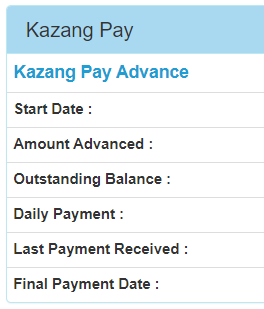
How to request a statement from Content ready
We can pull a report from CR and search on that report for the reference number of the vendor in question The report in question is report 454 - Active Kazang Pay Advances V2. On this report you would be able to see the breakdown of all active Kazang Pay advances.
Please see the steps below:
| Step 1 | Click on 'Reports" on Content Ready and search for report 454 (Select it when found) |
| Step 2 | Select the date range (From and to) |
| Step 3 | Insert your email address so the report can be sent to you (This report is not meant to be sent to vendors, it is for internal use only) |
| Step 4 | Once you have received the report you can search for the relevant wallet reference on the report to see all details relating to that vendors Kazang Pay Advance. |
Interest rates charged for Kazang Pay Advance
The interest rates will be more incentivising for the merchants as they will now be eligible for up to a maximum 15% discount rate on their Kazang Pay Advance when they have settled the balance early within the 90 day repayment period.
This will be a great incentive to not only provide the platform for vendors reach new business targets but also maintain ease of access to the Kazang Pay Advance feature.
Known Errors:
Error | Error Reason |
Kazang Pay Advance Failed: This account currently has active manual credit Meaning | Manual credit refers to a different type of credit that does not fall into the Credit Advance or Kazang Pay Advance category. For manual credit, an applications and agreement is signed directly with the agent and sent through for approval. If the vendor has this type of credit with Kazang, they would not be able to qualify for Kazang Pay advance. |
| Kazang Pay Advance Failed: The account does not have a valid Kazang Pay Advance configuration | This error means that the group from which the vendor is applying does not qualify for a Kazang Pay Advance. An example of this would be that accounts that form part of the SAB group would not be able to apply for the advance without getting the error mentioned above. |
Kazang Pay Advance Failed: This account does not qualify for Kazang pay advance. Your card settlements are being routed to another account | This error tells us that the vendor did not apply for Kazang Pay Advance from the account that their Kazang Pay settlements are being settled to. The application will be rejected even if the merchant does meet the Kazang Pay qualifying criteria on a different settlement account. For example, if the vendor applies for Kazang Pay Advance from their normal vending wallet but their settlements are being paid into the superwallet, the application will be rejected with the above-mentioned error. |
Groups that are currently configured for Kazang Pay Advance:
Not all groups have been configured with the possibility to take Kazang Pay Advance yet. This means that only if the Kazang account is part of the following groups, will they be able to qualify for a Kazang Pay Advance.
- Kazang a Division of Paycorp (VAS) - Direct Sales
- Kazang a Division of Paycorp (VAS) - Kazang Agent
- Qhakaza Africa Metering Products Systems (PTY) LTD
- Saicom
Blocked KPA in certain regions:
As business we have opted to switch off the below mentioned regions for KPA. We have picked up an increased number of delinquent accounts, where vendors are not paying back what is owed.
- KANC 3 (Kazang Agent Northern Cape)
- KAEC 25 (Kazang Agent Eastern Cape)
From now on vendors in this region will receive an error that they have not been active for KP long enough to qualify for a KPA. Even if the vendor does meet the standard qualifying criteria.
*Have we missed anything in this article?
Email jason.ariefdien@kazang.com should you need any more information to be added onto this article.
Was this article helpful?
That’s Great!
Thank you for your feedback
Sorry! We couldn't be helpful
Thank you for your feedback
Feedback sent
We appreciate your effort and will try to fix the article