Overview
Vendors earn commission for each successful sale and transaction that they complete on their registered device. These commission will be paid out to the vendor either on a daily or monthly basis depending entirely on the preference of the vendor.
This commission type is referred to as Deferred Commission and this article will equip our Contact Centre agents to assist and resolve this query type when it is raised by the vendors. All information relating to Deferred Commissions can be found on our Content Ready platform.
Where can an agent view the Deferred Commission on Content Ready?
To access and view all details regarding deferred commissions for our vendors, view the below guidance steps when navigating on our Content Ready platform. The Contact Centre agent can search for the account using the reference number that has been provided.
Action Step | Action Summary | Image |
| Step 1 | Access Content Ready | |
| Step 2 | Select the Accounting Tab followed by selecting the Deffered Commission option from the dropdown listing | 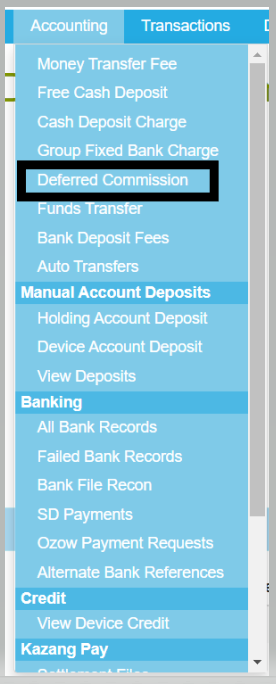 |
What information can an agent view regarding Deferred Commission on Content Ready?
Below is a summary of the details that will be available for viewing for our Contact Centre agents to assist and resolve deferred commission queries for our vendors:
Image Summary | |
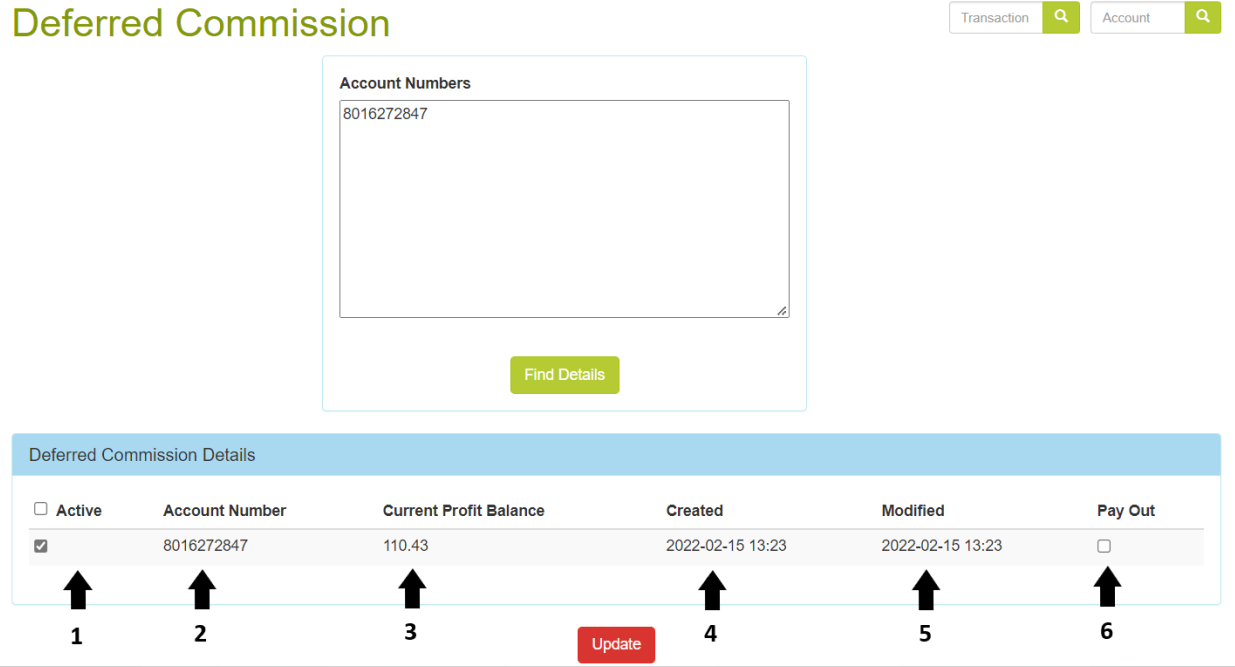 | |
| 1. Active | Under this tab, you would be able to see whether the commission pays out daily or monthly. - When ticked: Monthly (Pays out on the first day of each month) - When unticked: Daily (Pays out at 23:59 each evening) |
| 2. Account Number | This will specify the reference number of the account being looked at. |
3. Current Profit Balance | This will specify the amount of profit that has accumulated for the month to date. If paid out daily, it is unlikely that this amount will be very high as it was paid out the previous evening. |
| 4. Created | The date on which the monthly deferred commission was paid out will be listed under this heading. This is good to know because now you can see from which date the monthly commission started accumulating. |
| 5. Modified | Almost the same as "Created", it will specify the date on which the deferred commission for this account was modified. |
| 6. Pay Out | When this box is ticked and you click on update, then the commission gets paid out to the device. We can only take this action when it is requested by a Kazang Rep or Agent, usually when they are reissuing the device. |

*Have we missed anything in this article?
Email learninganddevelopment@kazang.com should you need any more information to be added onto this article.
Was this article helpful?
That’s Great!
Thank you for your feedback
Sorry! We couldn't be helpful
Thank you for your feedback
Feedback sent
We appreciate your effort and will try to fix the article