Overview:
When our vendors process sales on their Kazang device, they earn commission for each sale which will get paid out to their device either daily or monthly. Below we explore the deferred commission tab and take a look at all the features available to you, that will enable you to answer any questions that vendors may have.
Where to find it:
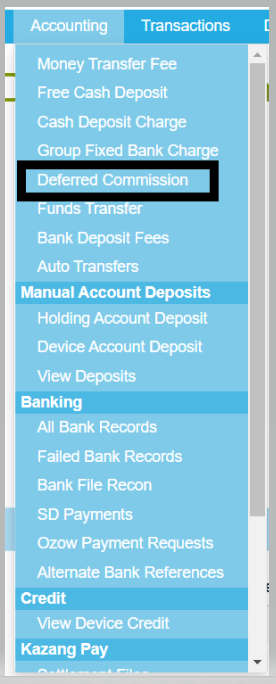
Our deferred commission tab is listed under the Accounting tab, once you click on this tab you would be able to search for the account using the reference number.
The features available:
Below we take a look at what features are available on this tab and also explore what each feature will enable you to do.
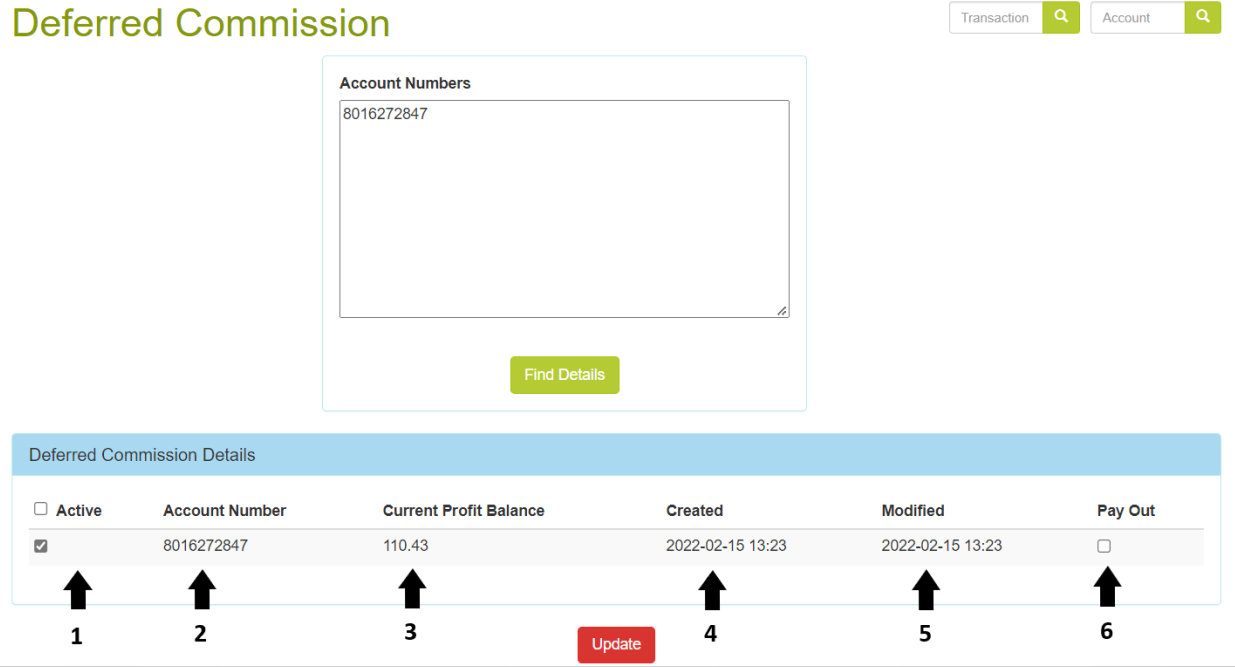
1. Active
Under this tab, you would be able to see whether the commission pays out daily or monthly.
- When ticked: Monthly (Pays out on the first day of each month)
- When unticked: Daily (Pays out at 23:59 each evening)
2. Account Number
This will specify the reference number of the account being looked at.
3. Current Profit Balance
This will specify the amount of profit that has accumulated for the month to date. If paid out daily, it is unlikely that this amount will be very high as it was paid out the previous evening.
4. Created
The date on which the monthly deferred commission was paid out will be listed under this heading. This is good to know because now you can see from which date the monthly commission started accumulating.
5. Modified
Almost the same as "Created", it will specify the date on which the deferred commission for this account was modified.
6. Pay Out
When this box is ticked and you click on update, then the commission gets paid out to the device. We can only take this action when it is requested by a Kazang Rep or Agent, usually when they are reissuing the device.

*Have we missed anything in this article?
Email jason.ariefdien@kazang.com should you need any more information to be added onto this article.
Was this article helpful?
That’s Great!
Thank you for your feedback
Sorry! We couldn't be helpful
Thank you for your feedback
Feedback sent
We appreciate your effort and will try to fix the article