Overview
Vendors have access to one of our larger device options that allows them to complete bulk cash deposits without the hassle of traveling into a bank. With our Vault device, vendors can complete bulk cash deposits for all their funds traded and we are able to assist them comfortably with any queries that they may have.
This solutions article will ensure that our Contact Centre agents understand the below process flow points:
- Understand the process flow for our vendors to complete a safe drop
- Understand how the vendor's safe drop reflects on our Webflo platform and how it reflects in the wallet of the vendor
- Understand any delays that may have a negative impact when a vendor completes a safe drop
What are the systems that we use to track all drop safe transactions?
System Name | System Summary |
| Webflo | This is the system that our Cashless Support Teams use to assist in more complex drop safe queries. Here they will be able to trace all details relating to a drop safe transaction completed by the vendor. |
| Content Ready | This is the system that our primary Contact Centre teams use to review the details provided by the vendor in the ticket request raised. Here they will be able to provide initial information for the vendor to resolve their query at first point of contact. |
How does a vendor complete a safe drop?
Below is the guidance steps that the vendor will follow to successfully drop cash into the vault that has been installed into their store location:
Action Step | Action Summary |
| Step 1 | The vendor is specify the amount that will be dropped into the vault and the account that the funds will be allocated to followed by physically inserting the cash into the vault. |
There are a few important things as an agent that one MUST note once a vendor has completed their safe drop into the vault that has been installed:
- Money allocated to the vendor's wallet will reflect on our Content Ready systems once they have successfully completed the safe drop.
- It will approximately take around 20 seconds for the transaction to reflect on Content Ready
- It will approximately take around 15 seconds for the transaction to reflect on Webflo
- The agent handling the query will be able to view the date and time of the transaction on Content Ready
How to view the drop safe transaction on Content Ready?
Below is the guidance steps that the agent handling the query will follow to view the drop safe transaction on Content Ready:
Action Step | Action Summary | Image |
| Step 1 | Enter any of the below information provided by the vendor into the Account Search bar on Content Ready:
|  |
| Step 2 | Navigate to the Drop Safe summary box on the following screen | |
| Step 3 | The following information will be displayed:
| 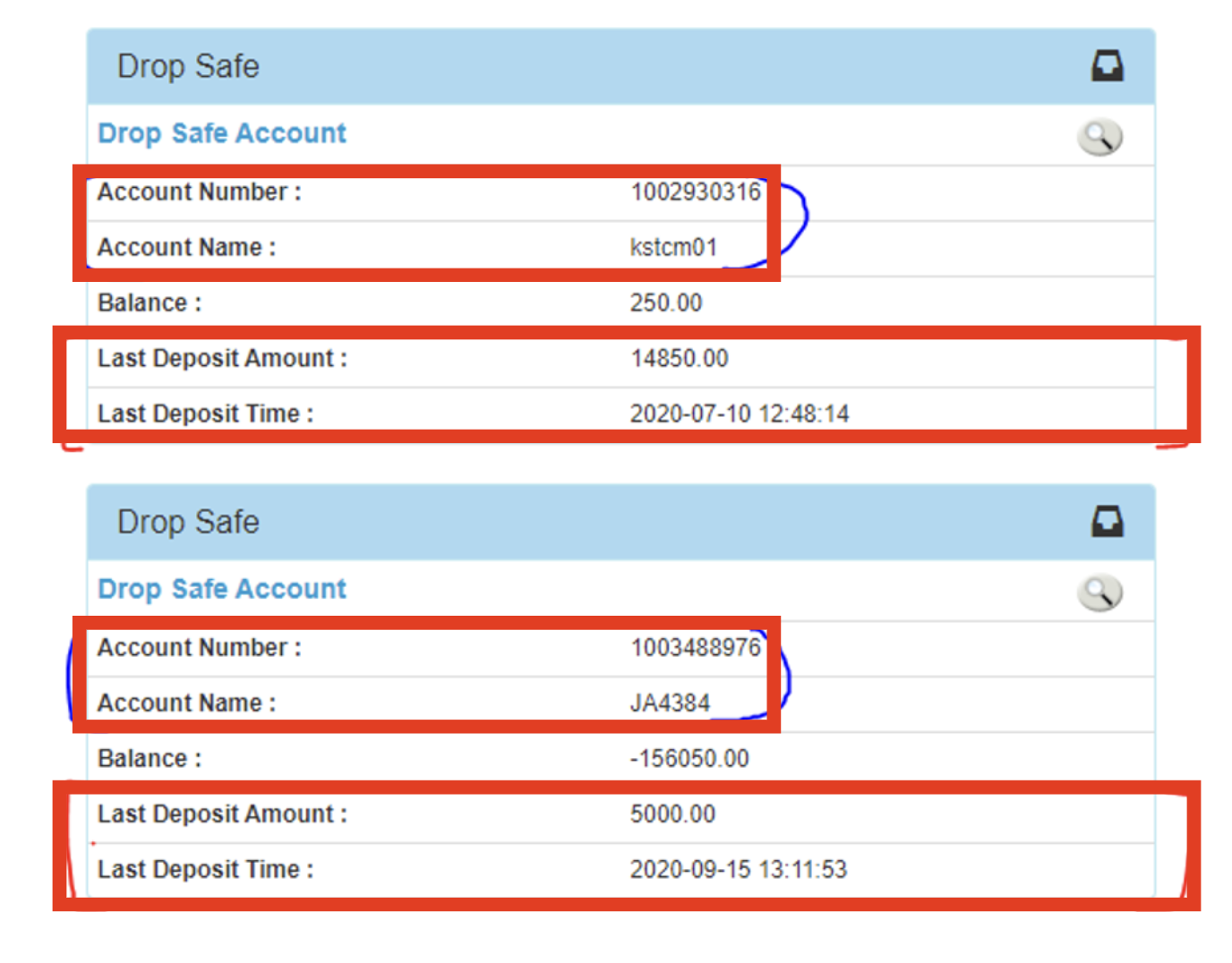 |
To review a more detailed list of the drop safe transaction, simply click on the Magnifying Glass icon:
| Detailed Transactions |  |
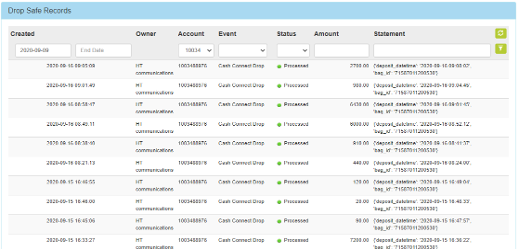
On the detailed transaction screen, the below information will be presented to the agent for further investigating:
Detailed Transaction View on Content Ready |
 |
|
Escalation Matrix
All queries that require to be escalated need to sent to the inbox of the Cash Connect Support team using the ContactCentre@cashconnect.co.za address.

*Have we missed anything in this article?
Email learninganddevelopment@kazang.com should you need any more information to be added onto this article.
Was this article helpful?
That’s Great!
Thank you for your feedback
Sorry! We couldn't be helpful
Thank you for your feedback
Feedback sent
We appreciate your effort and will try to fix the article