
What does it mean to blacklist a supplier?
When our vendors pay suppliers, it is ultimately a VCD that is done from the vendors Kazang account, to the suppliers Kazang account.
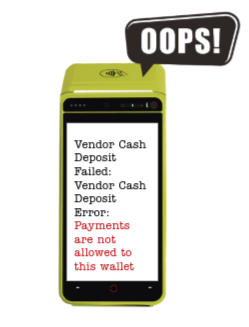
To blacklist a supplier means that the vendor has taken a decision not to allow any payments from their Kazang account to the respective Kazang account belonging to the supplier. Should this vendor or one of their employees attempt to make a payment to the supplier that has been blacklisted, they will be presented with an error on the device.
Who can edit the blacklist?
Not everyone in the business has access to edit the blacklist. This permission has only been granted to the cashless payments team who forms part of our business development department.
Escalation path
Any queries can be escalated to our cashless payments team on the following email address:
Support email: cashless@kazang.com
This email address cannot be given to vendors and our support teams will need to send an email to the cashless team on outlook with the following information:
- Account number of all accounts involved in the query
- Query explanation
- Contact number
If our support team has received a query via a ticket or a chat, they will add a screenshot of their escalation to the ticket/chat and close the ticket/chat.
Our cashless payments team currently do not have an SLA in place for these queries.
Was this article helpful?
That’s Great!
Thank you for your feedback
Sorry! We couldn't be helpful
Thank you for your feedback
Feedback sent
We appreciate your effort and will try to fix the article