Introduction:
All the leads must be sent through Fresh Desk or Fresh Chat and we do not do telephonically leads, however we advise the caller to send their request via mail & chats. This is to ensure that we get accurate information from the potential client.
This process applies to both L1 and L2
Rentals can be done via our 2 representatives:
- Direct Sales – This are all the devices that are with the acronym DS on the code.
- Kazang Agent – This are all the device that start with the acronym KA on the code
Fresh Desk:
Adviser needs to get all the necessity information from the potential client, which are as follows:
- The Name and Surname of the potential client.
- His/her contact number.
- The province or suburb they are in
- The type of device they are interested in.
- Type of contract, the potential client must indicate if they want to buy or rent the device (sales or rental)
Below is the template we use for new leads:
Good day
Thank you for contacting Kazang Connect.
We have two options purchasing and rental.
For rental devices we require you to have an operating business, please find more details and prices below.
Purchasing option:
Timpa X (touch screen machine): R 2587.50 including VAT.
Rental: Timpa X (touch screen machine): R150 rental premium is charged per month if you're not meeting the sales target of R20 000.
What you will get to sell!
- Device offers value added services
- Airtime & Data
- Electricity
- DSTV payments
- Bill payments
- Supplier payments
- Entertainment voucher and many more Our device also accepts card payments which will benefit your customers as they can use their bank cards to sell all the products you sell in your store. Exciting right?
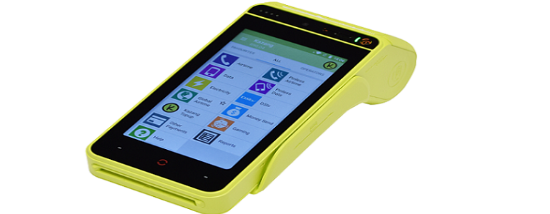
- Below is the device we offer, Timpa X
To further with your request kindly provide us with the below details depending on your chosen option.
Rental Option
- Name & Surname:
- Contact details (include alternative contact number if you have):
- Shop name:
- Full address:
- Province:
Purchasing Option
- Name & Surname:
- Contact details (include alternative contact number if you have):
- Full address:
- Confirm an email address we must use for your quote:
- Choose one of the following options where you would like us to send your device:
- The Store to door option is also available at a cost of R120
- Please provide the details of your nearest Post office - delivery at a cost of R100
Kindly be advised we also have an option for online vending, you may download our Kazang App on your App/play store and follow the registration process.
Regards,
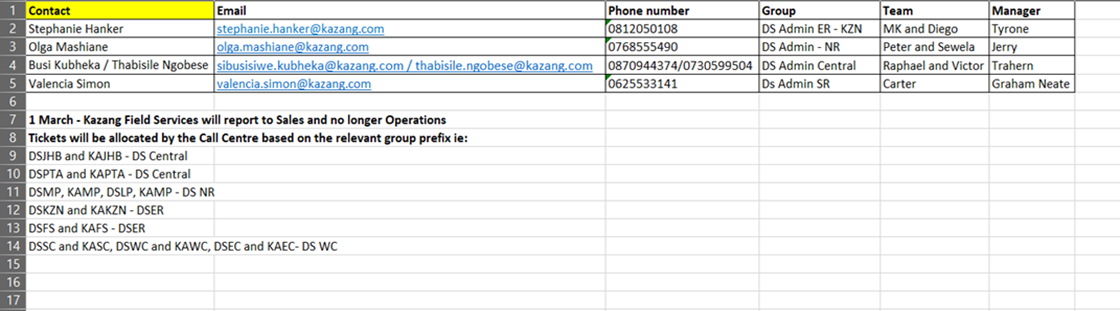
Once all the information has been provided, we need to forward all this information to the sales team through Freshdesk depending on region.
LEADS RECEIVED VIA FRESH CHAT:
To generate a ticket from Fresh chat you need to go to the chat itself. Once you are in the chat you will provide the client with the options. (Which can be found on canned response.) The same template and process should be used as the above one.
Once all this done the ticket must be correctly classified on both Fresh desk and Fresh Chats. All the ticket or chat must be closed once call has been sent to the sales team.
Rental device external sales leads:
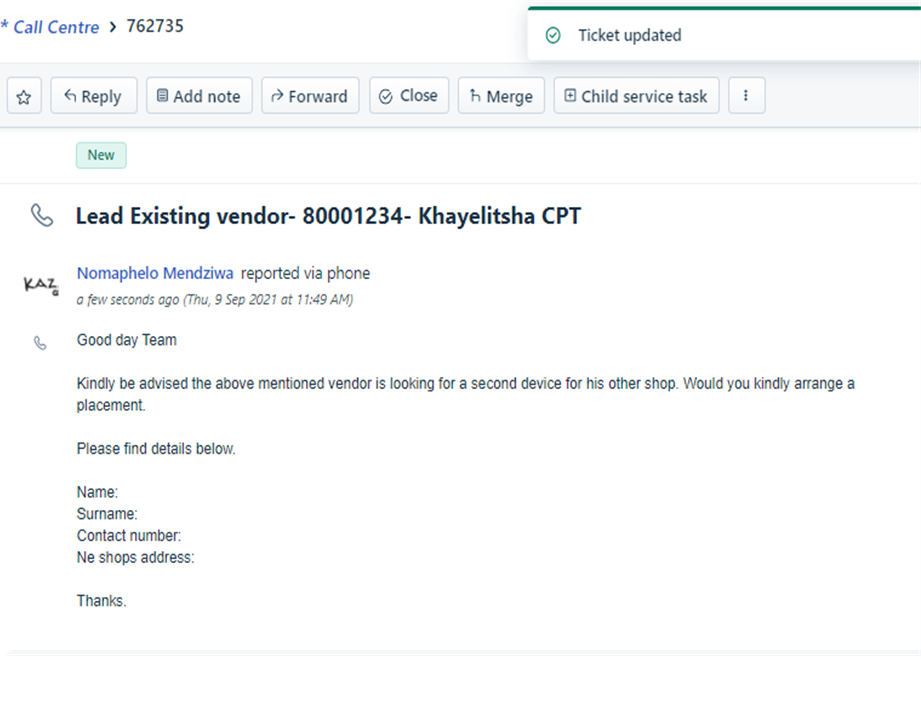
- For all existing vendors that are looking for new devices at their other shop escalations goes to sales queues as above.
- Vendor needs to provide with new address and existing reference number
- If inquiry is through call ticket needs to be created.
Cash sales leads:
We have leads that wants to purchase the device for them to own. In such instance we need to also gather the leads details.
Name & Surname:
Contact details (include alternative contact number if you have):
- Full address:
- Confirm an email address we must use for your quote:
- Choose one of the following options where you would like us to send your device:
- The Store to door option is also available at a cost of R120
- Please provide the details of your nearest Postnet - delivery at a cost of R100
- After we have received vendor’s details and escalated to the external sales queue.
- Mandy will send a quote to the vendor that will include a unique ref that a vendor will use when making payment and the quote will include our sales account number.
- After payment device will be sent to the nearest post office that Is provided by the vendor and tracking number will be sent. Vendor will need to personally collect the package as we don’t do door to door deliveries.
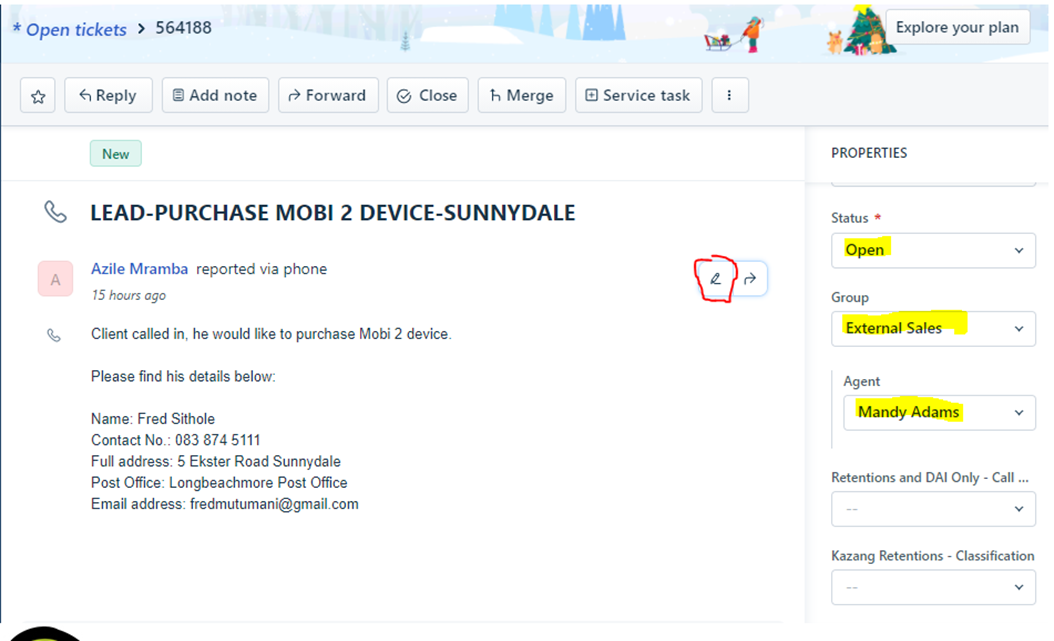
Step 1: The sales would be from the ticket/chats, so you will edit the ticket subject line from the ticket.
e.g., Subject for client: I need a device. Edit to; purchase of Timpa x-Gauteng-0645113781
Classification: Sales leads WC
Group: External Sales
Status: Open
Agent: Mandy Adams (Please inform her via an email or WhatsApp that you have assigned a ticket to her. (Mandy Adams)
THIS IS HOW THE TICKET SHOULD LOOK WHEN YOU FORWARD IT TO MANDY’S TEAMS:
Spares Purchasing for both Rental and Cash sales
- Rental devices spares need to be escalated to dispatchers for CRE’s to go on site and replace
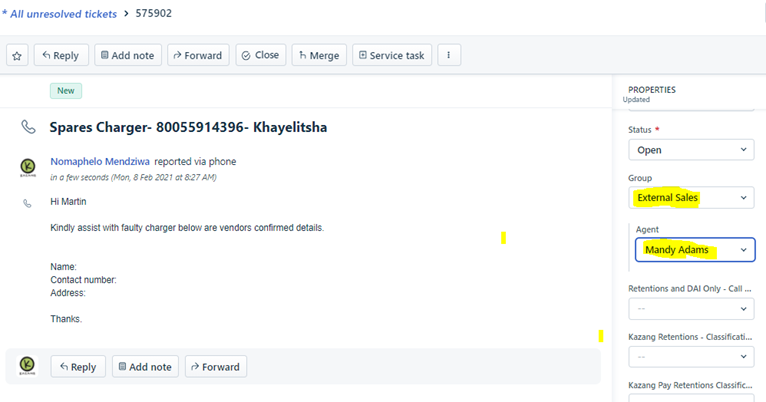
- Cash sales device spares need to be escalated to external sales
Rental device format.
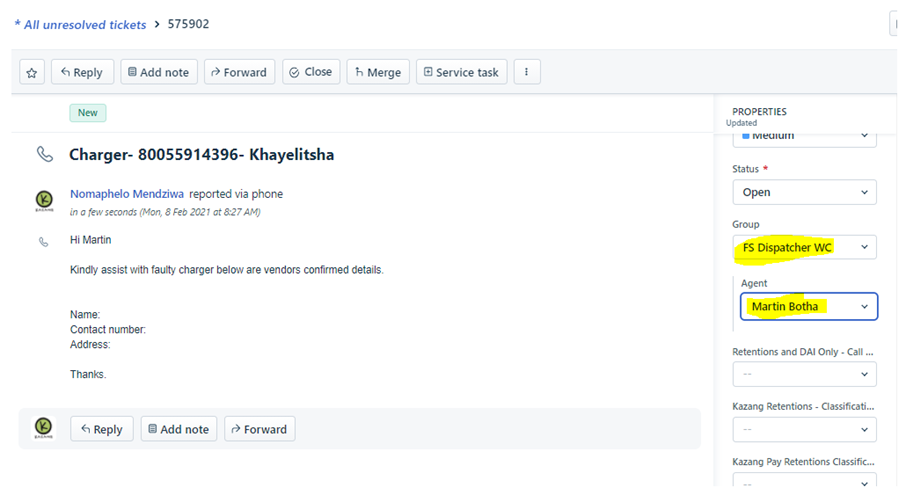
Cash sales format.
FAULTY / COLLECTION DEVICE
Request will come through on FD/FC and on a call
Consultant will troubleshoot to find out from the Vendor what might be wrong with the device
The Vendor will then provide us with their reference number for us to identify his portfolio
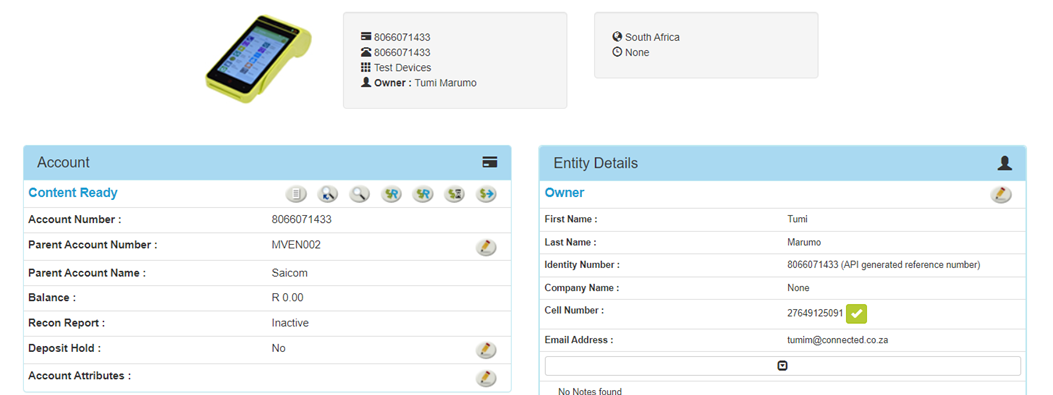
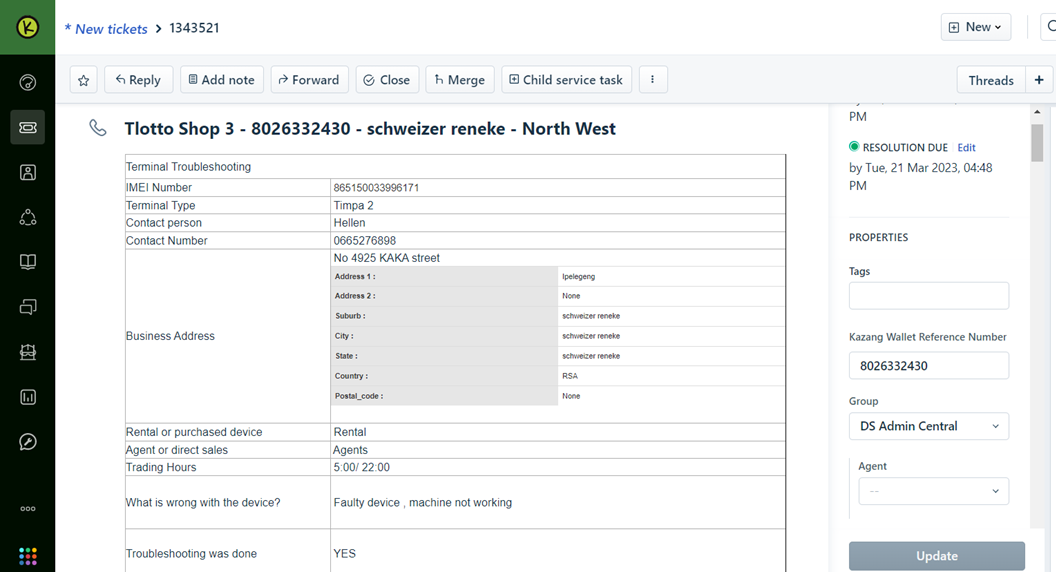
Requests received on a call, a ticket will be created, and the Consultant will use the highlighted Ticket templates.
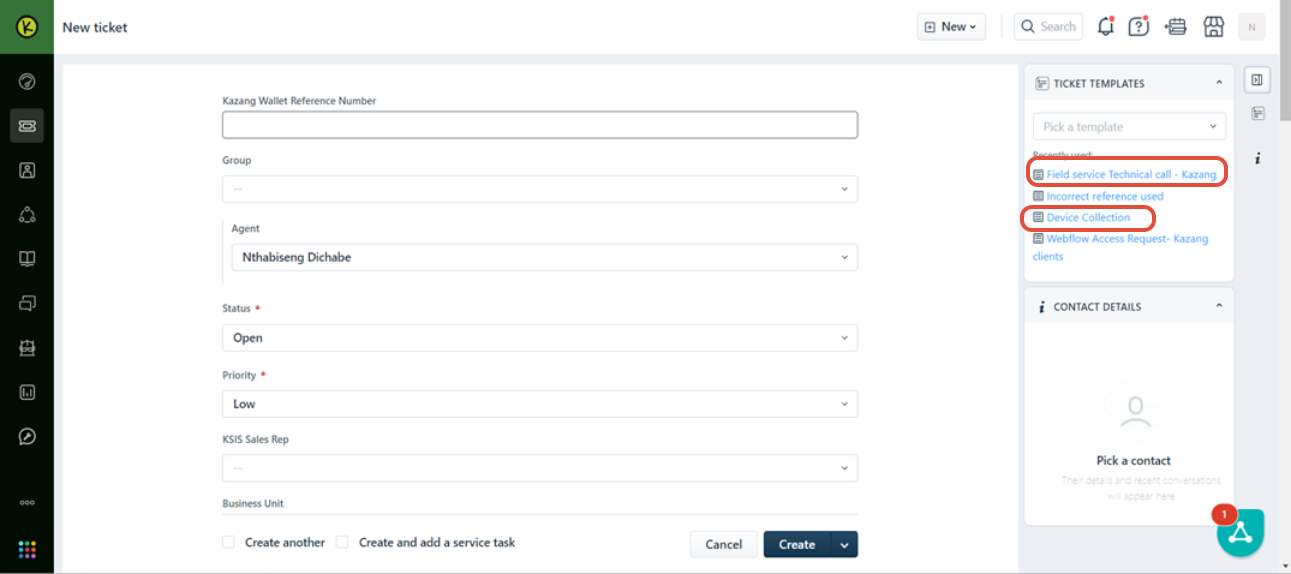
The ticket will be as the picture below
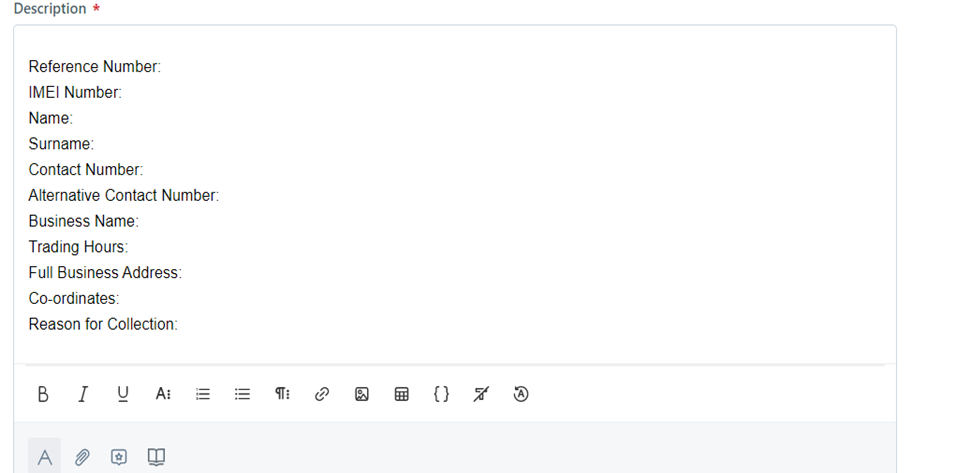
Below is the Collection Template
The vendor will request that we send out our Rep to come and collect our device as they are no longer interested in trading with us
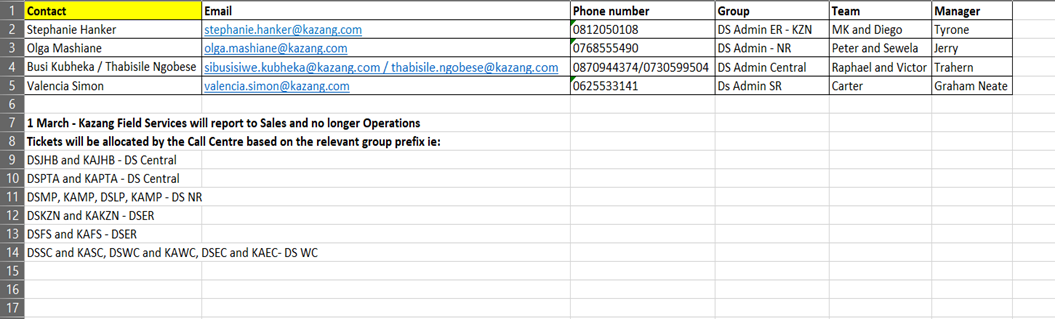
Below is the different Groups we use to send Faulty/Collection device requests
Was this article helpful?
That’s Great!
Thank you for your feedback
Sorry! We couldn't be helpful
Thank you for your feedback
Feedback sent
We appreciate your effort and will try to fix the article