gran·ary
[ˈɡran(ə)ri]
NOUN
- a storehouse for threshed grain.
- a region producing large quantities of corn.
Understanding what the word granary means kind of gives you an idea of what our Granary system does. It produces and stores vouchers, instead of corn or grain.
The Granary system is a system that helps us to generate vouchers internally for ourselves, and various third-party providers. Before having this system, we had to buy these vouchers in bulk each month and store these pre-purchased vouchers on our Content Ready system.
Since the implementation of the Granary system, we no longer bulk buy vouchers from certain suppliers. Instead, we generate the vouchers ourselves and send the supplier the money due to them for the sale of the voucher.
What Granary enables us to do, is to create a voucher in real time, only once it is purchased from our platform. This means a customer will come to one of our vendors, ask them for a voucher, once they click on the respective voucher then the following happens:
- Our device sends a call to Content Ready to request the voucher.
- Content Ready sends a call to Granary to create the voucher.
- Granary creates the voucher and sends a copy of the voucher to the supplier so it can be recognized on their systems and sends a copy of this voucher back to Content Ready.
- Content ready sends this voucher back to the device and is then printed out to complete the sale.
(This all happens in a few seconds)
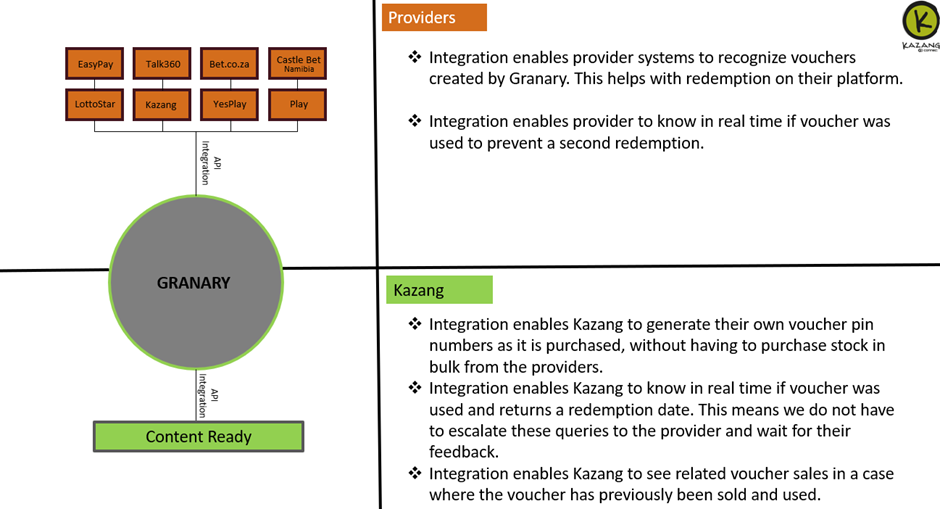
Which vouchers do we produce on Granary:
- Kazang top up vouchers
- Bet.co.za vouchers
- YesPlay vouchers
- EasyPay vouchers
- LottoStar vouchers
- Talk360 vouchers
- Castle bet vouchers (Namibia)
- Play vouchers

Where can these statuses be seen:
You will need to navigate to the Transaction screen on CR for the transaction you wish to view. This is done by searching in the transaction search bar for the transaction reference number visible on the slip.
The different statuses and their meanings:
Status: New
Meaning: This voucher has not been redeemed yet

Status: This voucher has already been redeemed
Meaning: The voucher has been redeemed on the provided date and time

Status: This voucher has been removed
Meaning: The voucher has been deleted on CR's database as it has been there for over 12 months, meaning that the system is not able to get hold of the pin to check the status on Granary


Was this article helpful?
That’s Great!
Thank you for your feedback
Sorry! We couldn't be helpful
Thank you for your feedback
Feedback sent
We appreciate your effort and will try to fix the article